My Local AI Lab on an Old PC: What Actually Worked
Updated Aug 23, 2026
Introduction
I wanted to run AI locally on my own computer.
Not because I thought a home PC was going to beat the best cloud models. That would be a slightly optimistic way of looking at a GTX 1080 Ti in 2026. I wanted privacy, a model that could work without an internet connection, cheap background jobs, local RAG over my own notes, and a way to understand what the new agent tools were actually doing instead of treating them as magic boxes.
The computer is not new:
- Ryzen 5 5600, 6 cores and 12 threads.
- GTX 1080 Ti with 11 GB of VRAM.
- 16 GB of RAM.
- Windows 11 IoT Enterprise LTSC.
This post is the result of a few days of testing, breaking things, fixing them, testing them again, and then discovering that a green success field did not always mean that anything useful had happened.
The short version is this: local AI is very useful on this machine, but only after I stopped asking it to be a cloud agent with a smaller budget.
1. What I actually wanted to build
At the beginning I had several goals mixed together:
- A daily conversational model in Spanish and English.
- A coding model for small changes and scripts.
- A larger model for long, slow, offline research.
- RAG over Markdown notes and local documents.
- A private classifier for email and other structured data.
- An agent that could use tools, write files, and work unattended at night.
- A local web interface, mainly Open WebUI on top of Ollama.
That list already contained the first problem. Those are not one task. They are different tasks with different bottlenecks.
A model that is pleasant to chat with is not automatically good at writing a valid JSON file. A model that writes code quickly is not automatically good at research. A model that can read a lot of context is not automatically good at remembering the right document. And an OpenAI-compatible API is not an agent by itself. It is only a way of talking to a model server.
Before going any further, this is the map I wish I had drawn on the first day:
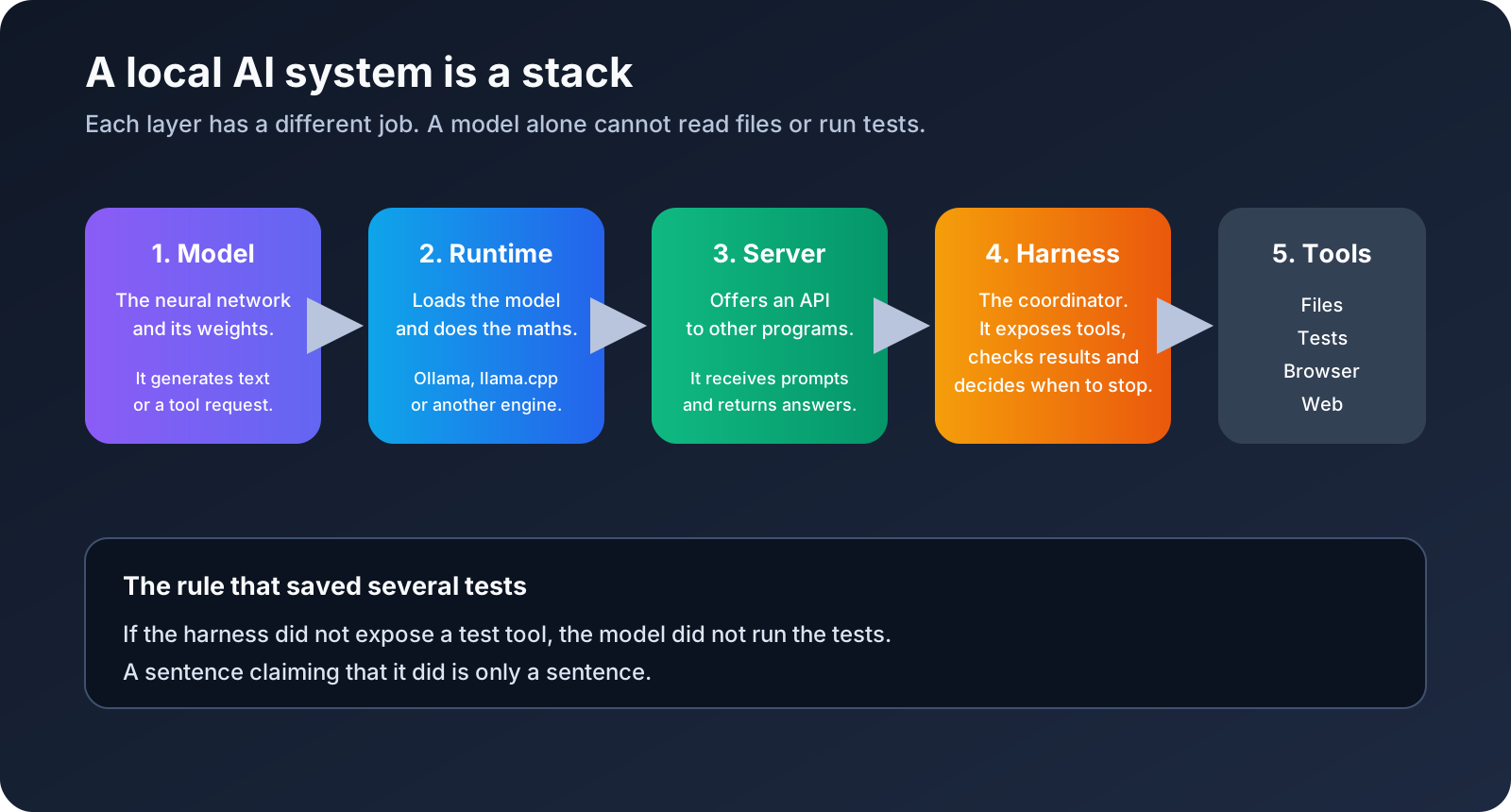
The model is the neural network. Its weights are the large file that contains what it learned during training. The model can generate text, JSON, or a structured request such as “please call the test tool with these arguments”. It does not automatically have access to my files or to a terminal.
The runtime, also called a runner or backend, loads those weights and performs the calculations needed to generate the next token. Ollama and llama.cpp are examples. They are not the model itself. They are the programs that make the model run on the CPU and GPU.
The server is the door through which another program talks to the runtime. It receives a prompt through an API and returns the model’s answer. An OpenAI-compatible API only means that the door uses a familiar shape. It does not mean that the server has tools, memory, permissions, or an agent behind it.
The harness is the coordinator around the model. It decides which tools exist, validates the model’s requests, executes approved operations, feeds the results back, checks the output, and decides whether the task is finished. People also use “agent” for a model plus this loop. In my tests the battery was driven by my own Python harness, not by OpenCode, even when one experiment used an agent-style interface.
The final layer is the tools: reading a file, writing a file, running a test, opening a browser, or searching a permitted URL. Those permissions have to be implemented somewhere. If the model says I ran the tests but nobody gave the harness a test tool, the tests were not run. That sentence is only text.
I had initially treated the whole stack as one product. It is not. Keeping these layers separate made almost every later failure easier to understand.
That sounds obvious after writing it down. It was less obvious after watching a model confidently announce a result it could not possibly have verified.
2. The first mistake: choosing by size
My first instinct was the usual one. Find the biggest model that can somehow fit, quantize it aggressively, give it a long context, and hope that its extra parameters compensate for everything else.
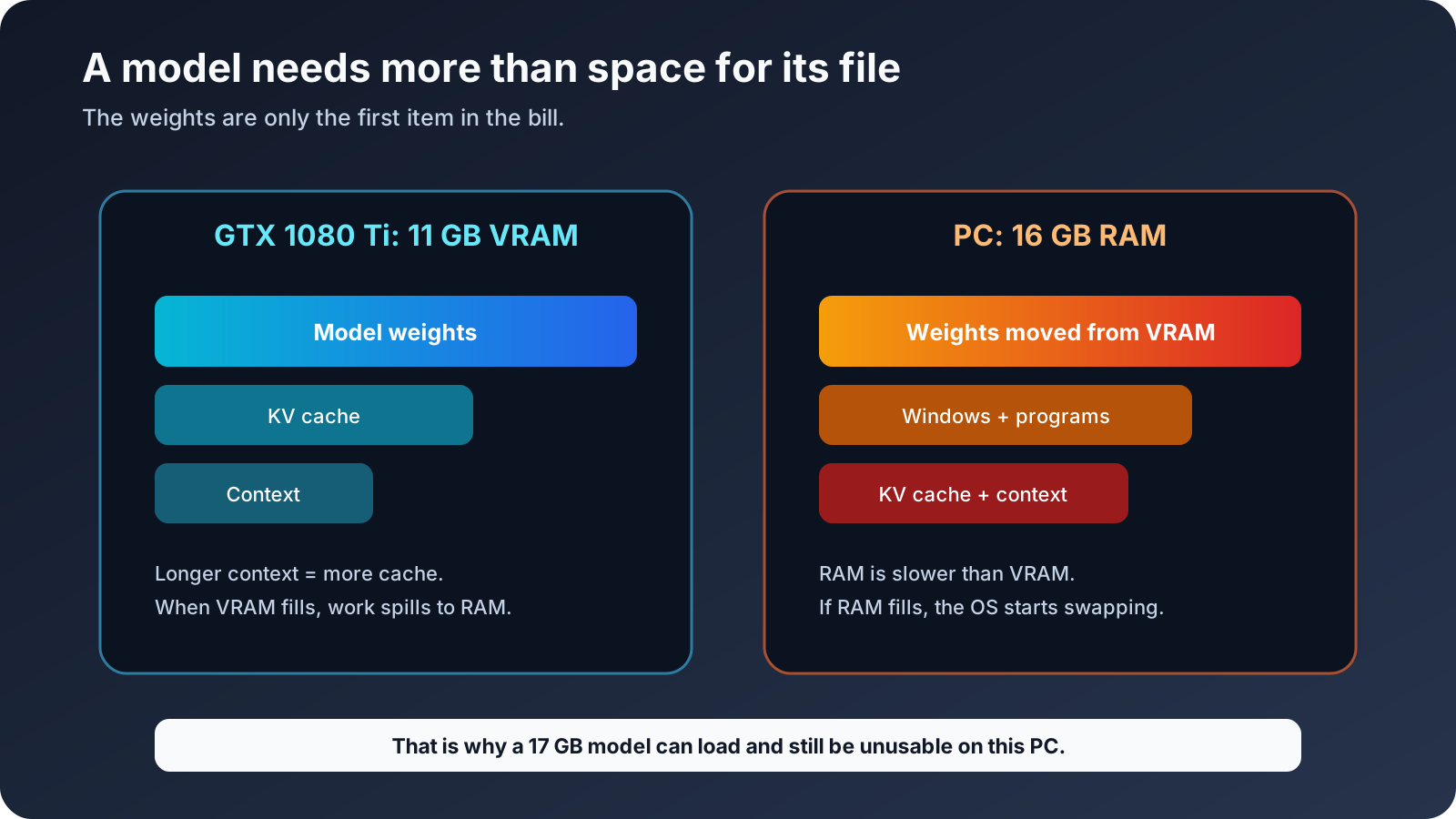
That led me to Qwen3.8 in a Q4-style build. The file was around 17 GB. My graphics card had 11 GB of VRAM and the computer had 16 GB of RAM. The arithmetic was not encouraging, but I still tried it because “offloading” sounds more magical than “putting a large part of the model in memory that is already nearly full”.
The result was technically a model that loaded, but it was not a usable model. It was painfully slow, sometimes taking more than two minutes without producing anything useful, and it pushed the machine into the kind of memory pressure where every other test became meaningless.
There are three different numbers here, and they are easy to mix up:
- The size of the model file on disk.
- The amount of VRAM on the graphics card.
- The amount of RAM available to Windows and the rest of the programs.
They are related, but they are not interchangeable. VRAM is the fast memory next to the GPU. RAM is the computer’s main memory. If the model does not fit in VRAM, a runtime can move some layers to RAM. That may make loading possible, but every trip between RAM and VRAM costs time. If RAM itself fills up, Windows starts swapping pieces to disk. At that point the computer can look frozen even though the process technically has not crashed.
There is also a difference between parameters and weights. “27B” means roughly 27 billion learned parameters. It is a useful way to describe the model, but it is not a promise about how many gigabytes it will occupy. The file size depends on how those parameters are stored.
That is where quantization comes in. Quantization stores the weights with fewer bits. A Q4 build uses roughly four bits per weight, with some extra information for blocks. An IQ2 build pushes the compression further. It takes less space and usually runs more comfortably on a small GPU, but it gives up some numerical precision. It is a trade, not a free upgrade: IQ2 helped this experiment fit and run, but it did not make the model more intelligent.
The practical question was therefore not “what is the largest model I can download?” It was “what model, precision, context and runtime can finish a real task without taking the rest of the PC hostage?”
The first lesson was not “large models are bad”. It was “a model that fits on paper may not fit in a workflow”.
I also made a false conclusion about GPU support. One early llama.cpp build reported no device, so I wrote down that this route was CPU-only on my machine. Later I discovered that I had an incomplete package. A newer CUDA-enabled build detected the GTX 1080 Ti correctly. The installation, not the GPU, had been the problem.
This is exactly the kind of failure that can send somebody down the wrong path for a whole weekend. Before comparing models, I should have validated the native runtime with a tiny known-good request and checked that the GPU was actually being used.
The official llama.cpp repository is useful here because it makes the runtime layer explicit. It is not just a model downloader. It is an inference engine with different build and acceleration choices, and those choices change the experiment.
3. How I tested instead of trusting the first output
I built a battery around isolated workspaces and repeatable tasks. The tests covered three broad areas:
- Closed-corpus research, where the answer had to come from supplied material.
- Code generation, including static checks and a real browser check.
- RAG over a small local knowledge base.
The important part was the definition of success. A benchmark is simply a repeatable test with measurements attached. In my case the measurements included completion time, generated tokens per second, RAM, VRAM, GPU temperature and whether the required result was actually correct.
At first, the harness considered a run successful when the process ended, the expected file existed, and the response looked structurally valid. That was not enough. A file can exist and still contain nonsense. A web project can pass a static check while rendering a blank page. A model can produce valid JSON with the wrong labels.
So I added more checks:
- Required files had to exist.
- The harness reread them instead of trusting the model’s summary.
- JSON had to be valid and contain the expected IDs.
- Generated code had to pass static checks.
- Web projects had to be opened in a browser.
- Research answers had to be checked against the supplied evidence.
- The logs had to say which tools were actually available.
- Temperature, context, max output, and model loading had to be kept consistent.
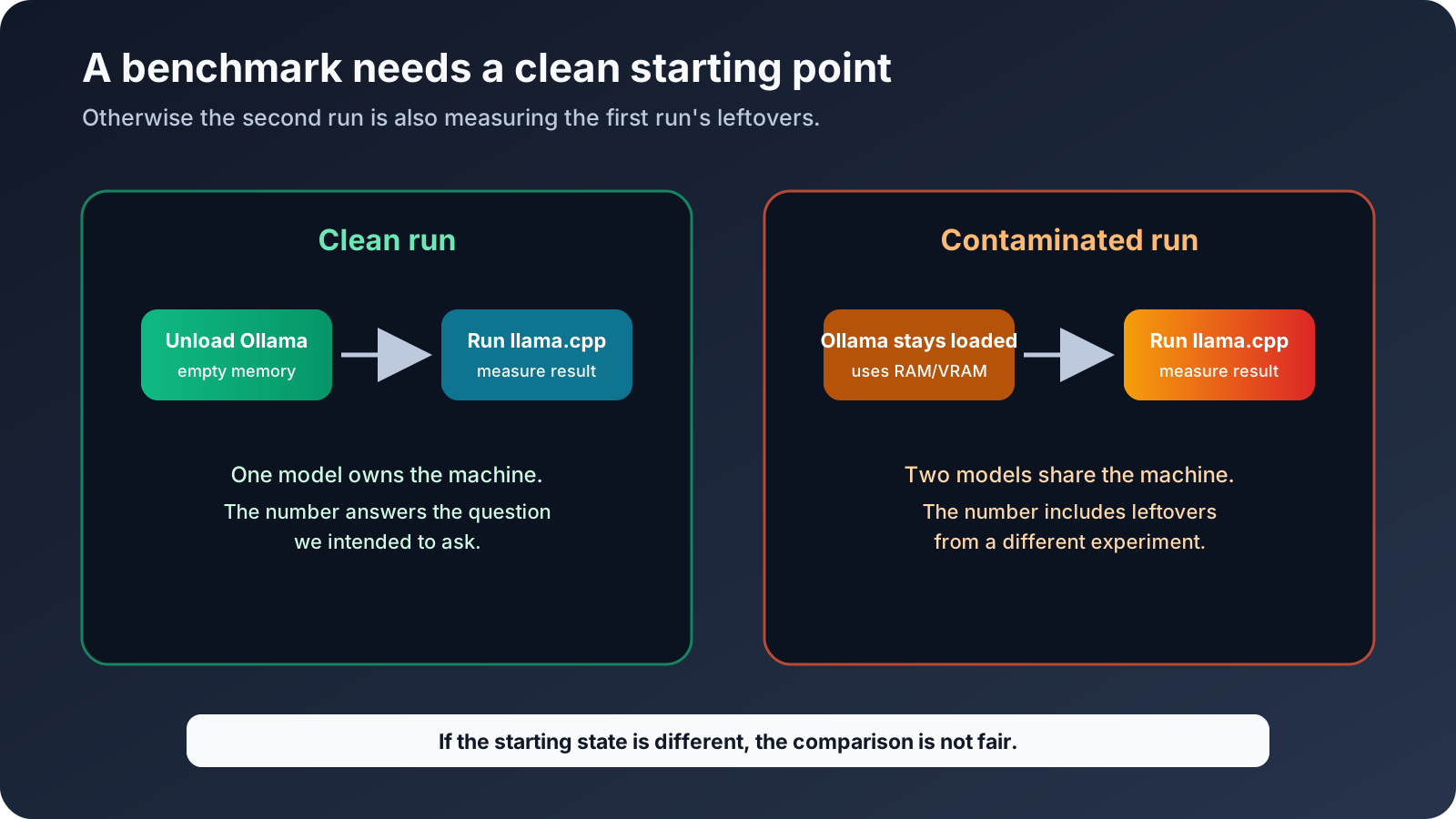
There was also a more boring but important rule: if Ollama and llama.cpp were both holding models in memory, I discarded the measurement. Otherwise I would not know which process was using the RAM or VRAM, or why the second model was slower. That is what “contaminated benchmark” means here: the number may be real, but the test no longer measures the thing I thought it measured. I reset the machine state and ran it again instead of keeping an attractive number.
The test suite ended up with 24 combination runs, plus focused RAG and email tests. I ran models sequentially rather than trying to squeeze several of them into the GPU at once. The machine needed time to unload one model before loading the next, and the temperature watchdog stopped runs when the GPU approached the unsafe range or the available RAM became dangerously low.
The watchdog measured the computer’s physical temperature, not a model setting. Around 85 °C means the GPU itself was hot. That is different from a generation parameter also called temperature, which controls how predictable or random the model’s word choices are. I changed the hardware run temperature because I did not want to cook the card; I would change model temperature because I wanted a different writing style. Same word, different thing.
This is why some numbers in the notebook are not perfectly comparable. Early tests were exploratory. The later battery is the one I trust most because it isolated the variables better.
4. The Qwen3.8 story: from unusable Q4 to a viable IQ2
The most interesting experiment was not a clean victory. It was the process of turning Qwen3.8 from “this is not practical here” into “this can do one very specific job”.
I tried different runtimes and quantizations. The Q4 version under Ollama was close to exhausting the machine. The smaller IQ2 build was around 7.8 GB and lost precision compared with Q4, but it gave the runtime enough room to breathe.
The working llama.cpp configuration used several flags that are easy to copy without understanding. Here is what they mean in plain English.
CUDA offload of all available layers
A model is made of layers, which are repeated blocks of neural-network calculations. -ngl all tells llama.cpp to place as many of those layers as possible on the CUDA GPU. More work on the GPU is normally faster than doing it on the CPU, but “all” does not mean “ignore the size of the card”. If there is not enough VRAM, the runtime keeps some work in RAM or refuses to load it.
In my first llama.cpp package the GPU was not detected at all. That made the model run at roughly 2.2–2.3 tokens per second and led me to blame Pascal support. The later CUDA build detected the GTX 1080 Ti and produced around 11 tokens per second. The important lesson was to check GPU detection before drawing conclusions about hardware.
Flash Attention
Attention is the part of a language model that compares the current token with the tokens already in the context. The straightforward calculation needs a lot of temporary memory. Flash Attention is a more memory-efficient way of doing that calculation. It does not add knowledge to the model and it does not enlarge the context window. It can reduce memory use and improve speed when the GPU and build support it.
The KV cache at 8 bits
While a model reads a prompt, it creates intermediate information about the tokens it has already seen. The runtime keeps that information in a key/value cache, usually shortened to KV cache, so it does not have to recalculate the whole conversation for every new token. A longer context needs a larger cache.
I used q8_0 for that cache. It stores the cache in an 8-bit format instead of using a larger precision. That saves memory, especially with a 16K context. It is not the same as turning the model into an IQ2 model: IQ2 changes the model weights, while KV quantization changes the temporary working memory used during a conversation.
Direct I/O
Direct I/O tells the loader to read the model file in a way that avoids relying as much on the operating system’s normal file cache. It helps make model loading more predictable and avoids filling RAM with another copy of a large file. It does not turn a slow disk into a fast GPU and it does not reduce the number of calculations needed to generate text.
One sequence and a controlled context
I used one sequence, meaning one active conversation at a time. Multiple simultaneous conversations need multiple KV caches. The context setting is the maximum token budget for the prompt, previous messages, tool results and new answer together. It is not “how much the model remembers for free”.
The improvement was not a miracle inside the model. It was a better fit between the weights, the runtime, and the hardware.
The official Qwen3.8 project documents a much larger theoretical context than I could use comfortably. That distinction matters. A model can advertise a huge context window while the local computer only gives you a smaller practical window after the weights, KV cache, operating system, and application overhead have taken their share.
I tested the context in stages:
| Context | What happened |
|---|---|
| 4K | It could complete most of the research battery, but one check failed. |
| 8K | It completed the closed-corpus battery in the later run. |
| 16K | It was the recommended working point. Around 14K tokens were remembered in one stress test at roughly 11 tok/s. |
| 32K | It loaded, but I did not consider it validated for real work. |
At the 16K setting, the GPU reached about 79 degrees Celsius during the heavier run. Generation was roughly 11.27 tokens per second in one measurement. A token is a small piece of text, not always a whole word. Tokens per second is therefore only a rough speed indicator, but it is useful for comparing runs made with the same setup. This is slow compared with the smaller models, but acceptable for a night-time synthesis job if the job has checkpoints and a clear output contract.
The model also failed in several instructive ways before the harness improved:
- The context was too small and the answer was truncated.
- A JSON response was cut in the middle.
- The model answered in chat instead of creating the required file.
- Unicode handling caused a file-writing problem.
- The harness was then changed to validate UTF-8, required files, IDs, tool lists, and artifacts.
Once those contracts were enforced, the task worked. The main improvement came from the runtime and the harness, not from suddenly discovering that Qwen had become a better reasoner.
That is the honest conclusion. Qwen3.8 IQ2 is viable on this computer for slow synthesis and architectural thinking. It is not the model I want writing every small file in a repository while I am away.
5. The small models won the jobs they were given
The smaller models were less glamorous and much more useful.
Ornith for fast code and structured work
Ornith 1.5 9B in Q4_K_M was the fastest code-oriented option in the final tests. It produced around 32 to 33 tokens per second, used roughly 7 GB of RAM and 7.2 GB of VRAM, and stayed around the mid-80s Celsius at the top of the measured runs.
In the static code battery it completed 18 out of 19 checks. More importantly, the browser validation showed that the generated project actually worked. One early failure was not really a model failure: the harness mentioned a run_project_command tool in the prompt but did not expose the tool. After correcting the tool bank, the model behaved differently.
That failure is worth keeping in the article because it is very easy to blame the model for a broken experiment. The prompt said one thing, the available tools said another, and the model was judged for the contradiction.
Ornith is now my first candidate for:
- Small components and scripts.
- Classification and extraction.
- Fast first drafts.
- Tasks where a deterministic validator can catch mistakes.
It still needs tests. “Fast” does not mean “safe”.
Gemma for reliable everyday coding
The Gemma variant was slower, around 25 to 29 tokens per second in the battery, but it reached 19 out of 19 static code checks and passed the real browser check. It was the best general code result when I combined compliance with functionality.
That is a useful reminder that tokens per second is not the same as useful work per second. If the fast model needs three repair rounds and the slower one works on the first try, the slower one may be the faster choice in real life.
Qwen14 for a middle ground
The 14B agent model was slower than the small models, generally around 15 to 22 tokens per second depending on the runner and task. It was solid for bounded coding and tool-shaped tasks, but it did not justify being the default for everything.
Qwen3.5 4B for RAG and JSON
The 4B model surprised me. In the exact-evidence RAG control it reached 7 out of 7 checks in about 18 seconds and generated around 57 tokens per second in that run. It was not the strongest model in the room, but it was good at the specific job when the context contained the right evidence.
That is the model I would use for local extraction, short answers over retrieved notes, and structured JSON. It is cheap enough to run repeatedly and small enough that the machine does not become unusable while it is working.
Nomic embeddings are not a chatbot
The embedding model had one job: turn text into vectors for retrieval. It did that. I initially treated embeddings as a secondary detail, but retrieval quality ended up mattering more than model size in several tests.
When the retriever brought back the wrong document, a larger generator did not magically recover the missing evidence. It simply wrote a more confident answer from the wrong evidence.
6. The browser test changed the ranking
A static check reads the generated files and looks for known mistakes without actually using the application. A browser check starts the project, opens the page, clicks or types like a user, and watches what appears on screen and in the JavaScript console. The second test is slower, but it catches broken connections between HTML, CSS and JavaScript.
The static code score told a different story from the browser.
Qwen3.8 produced something that looked close enough in the static report, but the real browser showed zero visible notes. Its JavaScript wrote into an element called #cards that did not exist in the HTML. The console threw a TypeError, which in this case simply meant that the code tried to use something that was not there. The result was broken.
The plan-to-Ornith experiment had another kind of failure. Ornith produced a functional project, but Qwen3.8 never created the expected PLAN.md. Ornith then invented a different contract instead of following a shared plan, so the chain was technically alive but semantically disconnected.
This is where agent demos tend to hide the difficult part. A model can produce a lot of text and many files while still failing the interface between two steps. The handoff needs a schema, a required artifact, and a validator. Otherwise the second model is not implementing the first model’s plan. It is guessing what the first model probably meant.
When I say “contract”, I mean a small, explicit agreement between steps: the first model must create PLAN.md with named sections, the second must read it, and the validator must check that those sections and files exist. It is closer to an API contract than to a polite instruction in a prompt.
My final code ranking was therefore:
- Gemma for the best balance of compliance and browser functionality.
- Ornith for speed, with tests and repair available.
- Qwen14 for solid bounded work.
- Qwen3.8 for architecture, review, and slow synthesis rather than routine implementation.
7. RAG: the retrieval step is the whole game
RAG means Retrieval-Augmented Generation. In normal language: search my notes first, give the relevant fragments to the model, and ask it to answer using those fragments. It is not extra training and it is not a magical memory. It is a search step followed by text generation.
For memory I kept the source of truth in Markdown, with SQLite and FTS5 indexing around it. I used Basic Memory and its local embedding path, while also testing plain keyword retrieval through SQLite FTS5. An embedding is a numerical representation of a piece of text. Similar meanings should end up near one another, so embeddings can find a paraphrase even when it does not use the same words. FTS5 is the simpler keyword search: it is very fast when the query shares words with the document.
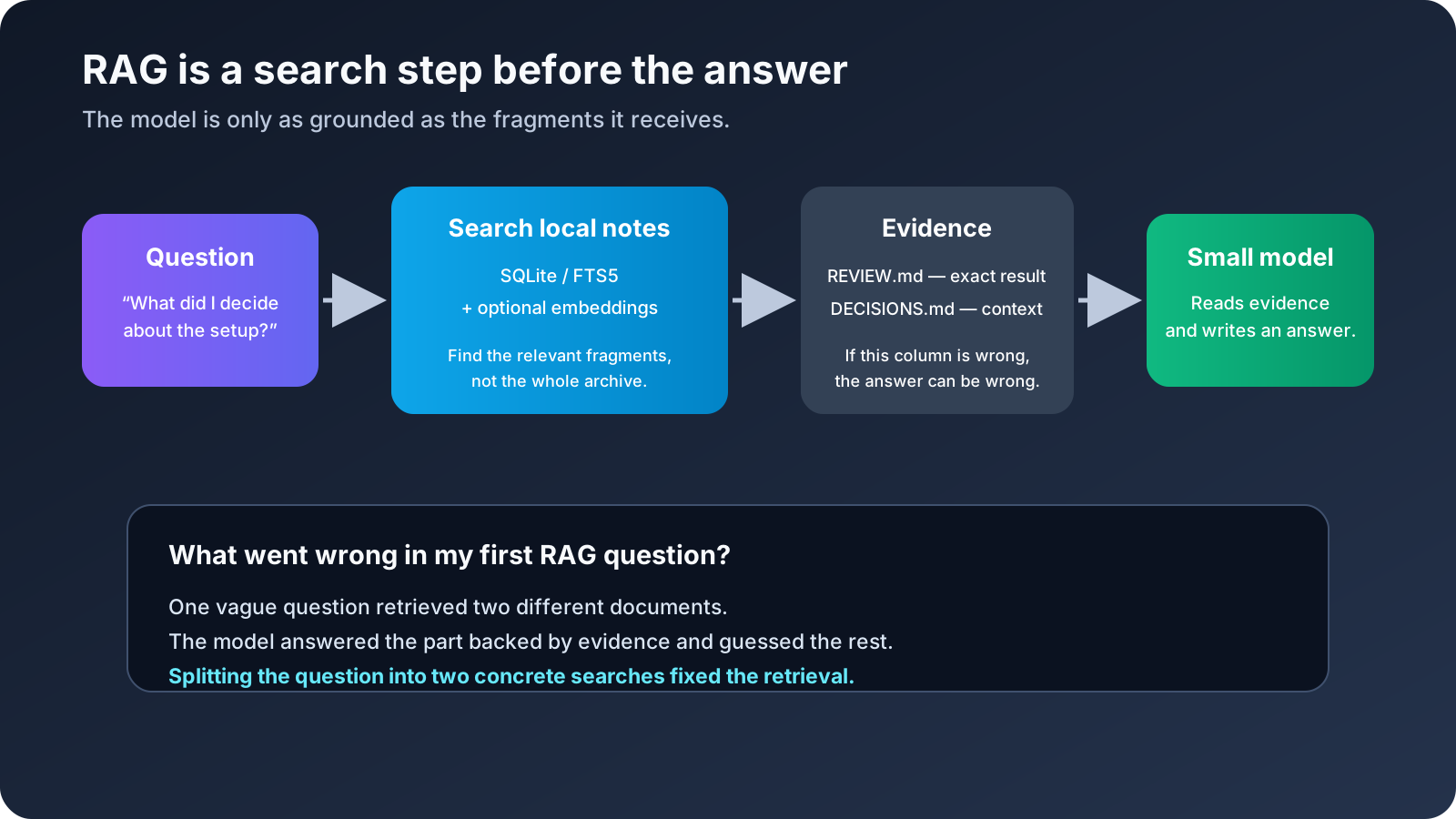
The setup was deliberately boring. Markdown is readable without the AI system. SQLite is inspectable. FTS5 gives me fast lexical search. Embeddings help with paraphrases. None of these layers is allowed to become an opaque memory blob that I cannot inspect.
The small benchmark showed the trade-off:
- FTS5 was extremely fast and perfect on exact matches, but weaker on paraphrases.
- A hybrid keyword plus embedding search improved paraphrase retrieval, at the cost of several seconds instead of milliseconds.
- A multilingual embedding cache I tested was weaker on this small corpus, so I removed it rather than keeping it because it sounded more sophisticated.
The most important RAG test was the one that failed for a very good reason. I asked an ambiguous question. The first retrieval returned the wrong document. Splitting the question into two concrete queries found the correct review, but a third query still returned a README instead of the exact evidence needed.
The scores reflected that:
- No RAG: 2 out of 7.
- Single retrieval: 4 out of 7.
- Multiple retrieval queries: 5 out of 7.
- Exact-evidence control with the small Qwen model: 7 out of 7.
The lesson is not “use more queries everywhere”. The lesson is that retrieval needs inspection. The generator cannot answer from a document it never received. A larger model can make the wrong retrieval look more polished, which is worse than an obvious failure.
For local RAG I would now do the following:
- Search with more than one formulation when the question is ambiguous.
- Show the retrieved titles and evidence to the user or validator.
- Require citations or exact snippets for important claims.
- Ask the model to abstain when the evidence is missing.
- Keep the Markdown source outside the model so I can inspect and repair it.
This is also why I did not build a huge “memory agent” first. I wanted a database I could query before I wanted an agent that claimed to remember everything.
8. The email experiment: coverage is not accuracy
I also tested local email classification. The data was kept local and is not reproduced here. The test used 99 real messages with no human-labelled gold standard and 9 synthetic messages with known labels.
That distinction matters. A classifier saying it processed 99 out of 99 messages only proves coverage. It does not prove that 99 classifications were correct.
Ornith processed all 99 real messages and got 8 out of 9 synthetic labels right. Gemma got 74 out of 99 real messages through the full path and also got 8 out of 9 synthetic labels right. Other small models were faster but weaker on the synthetic set.
Both of the better models made the same interesting mistake on an ambiguous commercial introduction: they classified it as promotion when the test expected review. That was not a reason to pick the model that sounded more confident. It was a reason to create a REVIEW path.
I also stopped treating a model’s own confidence field as real confidence. Asking an LLM to write confidence: 0.93 does not make the number calibrated. The design notes now separate:
- The prediction.
- The evidence used.
- The escalation decision.
For a serious classifier I would use log-probability margins when the runtime exposes them, exact evidence checks, deterministic business rules, and a labelled calibration set of a few hundred messages. Ambiguous, missing, invalid, or business-critical cases go to REVIEW.
The system must never move, delete, reply to, or send anything automatically. Local does not mean harmless. A private mistake is still a mistake, only with fewer witnesses.
9. The agent and harness experiments
This was the part where I installed and evaluated too many options, which is probably how these experiments are supposed to go.
My own restricted harness
The first practical harness was a small Python layer around the local model. It exposed a limited set of operations:
- List files inside the workspace.
- Read approved files.
- Write approved files.
- Verify required artifacts.
- Search or fetch from an explicit public URL list when the experiment allowed it.
There was no arbitrary shell, no delete tool, no access to personal directories, and no assumption that a tool mentioned in a prompt existed. This was less exciting than giving the model a terminal, but it made the failures understandable.
The harness also enforced maximum turns, maximum tokens, timeouts, required files, UTF-8, JSONL traces, and checkpoints. These are not glamorous features. They are the difference between an experiment and a process that quietly eats the computer overnight.
DeepSeek Harness
I tested DeepSeek Harness, which describes itself as a plugin-based open-source agent harness and is currently a developer preview. The idea is interesting because the runtime, tools, and integrations are treated as separate pieces.
My local smoke tests were encouraging for basic startup, reading a known file, and running through a restricted wrapper. I deliberately disabled PowerShell, web access, subagents, and the more experimental orchestration features. The version I tested was still moving quickly and had dependency issues around some of the more ambitious capabilities.
So I did not make it the foundation of the lab. I kept the experiment as a reference and preferred a smaller harness whose permissions I could explain line by line.
Qwen Code, OpenCode, Pi, Hermes, Aider and Goose
I looked at several tools because each solves a slightly different problem:
- Qwen Code has a useful tool-oriented workflow and local provider documentation, but the agent quality still depends on the model and the permission boundary.
- OpenCode is an interesting coding interface, especially if you are willing to use WSL on Windows, but adopting another full agent runtime would have added complexity before the local model routing was stable.
- Pi has a clear model and security documentation. I liked the explicitness, but I did not need another general shell agent for this experiment.
- Hermes supports local OpenAI-compatible endpoints, including Ollama and llama.cpp, and documents local memory and provider configuration. That makes it relevant, but its normal value comes from a fairly broad agent surface. On this PC I preferred starting with fewer tools.
- Aider’s lint and test loop represents a good principle: generated code should be checked by real tools instead of being accepted because the model says it is finished.
- Goose and Graphify were useful names to keep in the map, but neither solved the main bottleneck of this setup, which was reliable local execution under tight memory.
The decision was not that these projects are bad. It was that installing another agent did not solve the problem I was actually measuring.
AirLLM
AirLLM was especially tempting because its project presents 70B inference on a 4 GB GPU as a goal. I did not install it for the final setup.
The short answer to “was it because it only worked on Linux?” is: partly, but that is not the whole story. The installation path I was looking at was much more comfortable in a Linux-style Python environment. It depended on PyTorch, Transformers, Hugging Face model files and, for some compression paths, CUDA-related packages. Windows was not an absolute impossibility, but it added another compatibility problem before I had even tested the model.
The more important blocker was the model format. My working Qwen3.8 file was a GGUF IQ2 model loaded by llama.cpp. AirLLM’s documented path worked with original Transformers-style weights such as safetensors and split the model into layers. It was not a drop-in way to load the GGUF file I had already validated. I would have had to download a different copy of the model, build a second Python/PyTorch stack and then measure a different runtime.
There was also a practical performance question. AirLLM keeps only part of the model on the GPU and moves layers through memory as it works. That can make a very large model start on a small card, but the storage and CPU↔GPU traffic become part of every response. On a PC with 16 GB of RAM, that is a very different trade from keeping a 7.8 GB IQ2 file in a llama.cpp profile that already produced around 11 tok/s.
So the decision was not “AirLLM is bad” and not “Windows can never run AirLLM”. It was “this would be a second, Linux-leaning PyTorch experiment that does not use the model format or runtime I had already made reliable”. I already had a smaller model running with a validated runtime and a job that finished before the computer became a heater.
One detail is worth recording because software changes quickly: the current AirLLM repository now lists newer Qwen support than the documentation snapshot I used when making the decision. That may make a future test reasonable. It does not change what I actually tested, and it still would not turn AirLLM into a GGUF/llama.cpp replacement automatically.
10. The fixed three-model pipeline that I abandoned
One of the more appealing designs was:
- Qwythos reads and digests the sources.
- Qwen3.8 makes the architecture and decisions.
- Ornith writes the final code and presentation.
This worked well enough to look like an architecture diagram. It was not consistently better than using one appropriate model.
In the research battery, Qwythos produced a digest and Qwen3.8 reasoned over it, but the combined run took around four minutes and did not beat Qwen3.8 working directly on the source set. The pipeline only made sense when the digest would be reused, the corpus was large or messy, or the first pass had a value of its own.
The worst result came from using Ornith as the final presentation step after a correct Qwen output. It generated thousands of tokens, hit an HTTP 500, which is a server-side error, and left no valid index.html. The full chain scored 1 out of 9 on that final phase. A smaller model placed at the end can destroy a correct result.
The lesson was painful but useful: an orchestrator must validate contracts between stages. A model must not be treated as the judge of its own output. For normal work, the router is now simpler:
| Job | Preferred local path |
|---|---|
| Local notes and short RAG | Qwen3.5 4B plus retrieval and citations |
| Fast code and extraction | Ornith plus static and browser tests |
| Everyday coding | Gemma, with tests |
| Bounded tool work | Qwen14 |
| Long offline synthesis | Qwen3.8 IQ2 at 8K or 16K |
| Source digestion for reuse | Qwythos, only when the digest is worth keeping |
| Important review | Codex, Claude, or a human |
That last row is not an admission of defeat. It is a boundary. The local PC is a private worker, not a replacement for every other tool.
11. What I optimised
The final performance did not come from one magic flag. It came from a group of small decisions.
Runtime and memory
- Use the CUDA-enabled llama.cpp build and verify GPU detection first.
- Use Flash Attention where the model and build support it.
- Use an 8-bit KV cache to keep longer contexts possible.
- Keep one large model loaded at a time.
- Unload models before the next benchmark.
- Stop near the thermal and RAM limits instead of waiting for the system to become unstable.
- Measure the whole task, not just token generation.
Context
- Treat the context number as a budget, not a promise.
- Keep prompts, tool output, history, and generated output in the calculation.
- Split long research into stages.
- Save
summary.md,task.md, and artifacts instead of keeping one endless chat alive. - Use 8K for safer Qwen3.8 work and 16K when the task justifies the heat and time.
Harness design
- Make the tool list real and visible.
- Require output files instead of accepting a chat answer.
- Reread the files after generation.
- Validate IDs, JSON, encoding, and expected structure.
- Use deterministic checks wherever possible.
- Log enough to reproduce a failure without logging private content.
- Give the model a small workspace rather than the whole computer.
RAG
- Keep Markdown as the source of truth.
- Use FTS5 for fast exact retrieval.
- Add embeddings for paraphrases, not as a replacement for inspection.
- Retrieve with multiple formulations when the question is vague.
- Include evidence and citations in the answer contract.
- Allow abstention.
Security
The local services stayed on loopback. I did not expose the model API to the internet. The agents used dedicated workspaces and minimal permissions. The email classifier had no delete, move, or send action. Web access was either disabled or limited to an explicit list of public URLs.
The lab also used a watchdog around 88 degrees Celsius and stopped before the computer reached the point where the operating system started fighting the experiment. This is a home PC, not a data centre with someone paid to watch the rack.
12. What I would keep today
If I had to rebuild the setup from zero, I would do it in this order:
- Verify the CUDA runtime with a tiny model and a known GPU check.
- Install one small model and make it pass a file-writing and validation test.
- Add Markdown plus SQLite/FTS5 memory.
- Add local embeddings and compare them against keyword retrieval on a real mini-dataset.
- Add browser validation for code tasks.
- Add a medium coding model.
- Only then test the larger IQ2 model for a job that genuinely needs it.
- Keep all autonomous actions behind explicit approval.
I would not begin with a 70B model, a 1M-token claim, three chained agents, a general shell, or a mailbox with delete permissions. Those are all things that can be interesting later. They are poor foundations for discovering whether the local system works.
Conclusions
The most important result was not a token-per-second number. It was finding the boundary between useful local AI and wishful thinking.
The GTX 1080 Ti can run a surprisingly capable private stack when the jobs are divided properly. Small models handle fast extraction, coding, classification, and local RAG. A larger IQ2 model can do slow synthesis if the context is controlled and the task is checkpointed. The runtime matters. The harness matters. The retrieval quality matters. The validator matters.
The things that failed also taught me more than the clean demos:
- A large Q4 model can fit badly even when it technically loads.
- A missing CUDA build can look like a hardware limitation.
- A model cannot use a tool that the harness did not expose.
- Static code checks can miss a broken browser contract.
- A model can write a confident answer from the wrong retrieved document.
- A self-reported confidence score is not calibration.
- A chained pipeline can make a good result worse.
- Local privacy is not a substitute for permissions and validation.
So the final answer is not “local AI replaces cloud AI”. For this machine, the useful answer is more specific:
Local AI is excellent as a private, cheap, asynchronous layer. It can prepare data, classify things, retrieve notes, draft small changes, and run overnight. It is much less convincing as an unsupervised replacement for Codex or Claude on a complex repository.
That is a result I can actually use.
Documentation and further reading
These are the public references I used to understand the tools and technologies involved. The benchmark numbers and the decisions in this post come from my own local runs.
- Qwen3.8 official repository
- llama.cpp
- Ollama context length documentation
- Ollama FAQ
- Ornith 1.5 9B GGUF model card
- Basic Memory
- Basic Memory semantic search documentation
- SQLite FTS5 documentation
- DeepSeek Harness
- Hermes Agent FAQ and local providers
- AirLLM
- Qwen Code documentation
- OpenCode documentation
- Pi models documentation
- Pi security documentation
- Aider lint and test loop
- Goose
- Graphify
- Hero image: graphics card photo by Trần Chính on Pexels